# Authentication
Source: https://docs.therootnetwork.com/asset-register/authentication
There are two different types of authentication required based on the functionality you are trying to access. This guide will explain to you what they are and show you how to use them.
## Admin Functionality 🔒
Sign In with Ethereum (SIWE) is used to create access tokens to communicate with the authenticated endpoints on the Asset Register API (🔒).
You can generate these tokens using [this helper tool](https://ar-docs.futureverse.app/siwe-generator/). The contents generated in the Authorization box, after you sign, should be used as the `Authorization` header when making API calls.
## Asset Register 🔑
Any updates made to the asset register through a transaction (i.e. asset links) will need to be signed by a wallet, similar to any other blockchain transaction (🔑).
[Sign and send](/asset-register/guides/asset-link-operations#sign-and-send) the [Asset Link Operations](/asset-register/guides/asset-link-operations) guide explains how you can sign Asset Register transactions.
# Getting Started
Source: https://docs.therootnetwork.com/asset-register/getting-started
Learning how to use the Assets API
The Asset Register is a GraphQL API that can be interacted with through existing SDKs on JavaScript environments.
### SDKs
**React SDK**
The React SDK offers a convenient way to query assets within React-based applications. It leverages React's provider and hook-based approach, simplifying asset retrieval and integration within React projects.
[https://www.npmjs.com/package/@futureverse/asset-register-react](https://www.npmjs.com/package/@futureverse/asset-register-react)
**Core SDK**
The Core SDK is designed for Node.js environments but can also be utilized in frameworks other than React. It provides a versatile means of interacting with the Assets API, offering comprehensive asset querying and manipulation functionality.
[https://www.npmjs.com/package/@futureverse/asset-register](https://www.npmjs.com/package/@futureverse/asset-register)
#### GraphQL API
For developers seeking more customized functionality or specific use cases, direct interaction with the GraphQL API is also supported. The API is fully Relay specification compliant.
Using the API directly allows for fine-grained control over asset queries and enables the execution of custom calls.
#### Production
**Root** and **Ethereum Mainnet**
[https://ar-api.futureverse.app/graphql](https://ar-api.futureverse.app/graphql)
#### Staging
**Porcini** and **Goerli**
[https://ar-api.futureverse.cloud/graphql](https://ar-api.futureverse.cloud/graphql)
# Asset Link Operations
Source: https://docs.therootnetwork.com/asset-register/guides/asset-link-operations
Asset links can only be executed through a transaction. This guide will specifically focus on creating these operations using the SDKs.
## Prerequisite readings
[Asset Register Transaction](/asset-register/guides/asset-register-transaction) goes into detail about how to create and submit transactions, whereas, this guide will focus on the asset link operations in particular to help you build an asset tree.
In the following sections, we will focus on using the [ARTM library](https://www.npmjs.com/package/@futureverse/artm) to create and manipulate an ARTM and its operations.
## Create Asset Links 🔑
The user must own both assets to create links unless it is an off-chain asset, where only the creator of the child asset can create a link. Linking between assets owned on a FuturePass account and FuturePass account owner EOA is allowed. As long as the ownership resolution is satisfied links can be created across chains as well.
```typescript
import { Operation } from '@futureverse/artm'
const createAssetLinkOperation: Operation = {
type: 'asset-link',
action: 'create',
args: [
'equipWith_asmBrain',
'did:fv-asset:1:evm:0x6bca6de2dbdc4e0d41f7273011785ea16ba47182:1000',
'did:fv-asset:1:evm:0x1ea66a857de297471bc12dd12d93853ff6617284:21',
],
}
```
* The first argument corresponds to the `path` or the `subject` of the link.
* The second argument is the parent asset. An asset can have 0 to many links as a parent.
* The third argument is the child asset. An asset can have 0 or 1 link as a child.
## Delete Asset Links 🔑
The user must own the parent asset to delete links.
```typescript
import { Operation } from '@futureverse/artm'
const deleteAssetLinkOperation: Operation = {
type: 'asset-link',
action: 'delete',
args: [
'equipWith_asmBrain',
'did:fv-asset:1:evm:0x6bca6de2dbdc4e0d41f7273011785ea16ba47182:1000',
'did:fv-asset:1:evm:0x1ea66a857de297471bc12dd12d93853ff6617284:21',
],
}
```
You may have noticed that all the arguments look the same. This is because we have to be explicit with exactly which link we are deleting.
## Sign and Send!
Using the above operations you can create an ARTM as follows:
```typescript
import { ARTM } from '@futureverse/artm'
import { ethers } from 'ethers'
// Lets get you a wallet to get you started
const wallet = new ethers.Wallet(0xc367447789c3d98a0005c48b761ffe7d2802cea44dace8656033b15d90914c1d)
const artm = new ARTM({
address: wallet.address,
// Custom message to help the user understand the operation
statement: "Equip your ASM Brain",
operations: [
createAssetLinkOperation,
deleteAssetLinkOperation
],
nonce: 0
})
artm.setSignature(wallet.signMessage('\x19Ethereum Signed Message:\n' + artm.message)
console.log(artm.verify()) // true
// Submit the transaction!
```
In the above transaction, we are creating and then deleting the link in the same transaction. This is completely fine to do so but there is no reason to perform it other than for demonstration purposes!
Note that any invalid operation will result in the failure of the entire transaction.
# Asset Register Transaction
Source: https://docs.therootnetwork.com/asset-register/guides/asset-register-transaction
Transactions are made to the Asset Register using a messaging standard designed to be human readable and familiar to blockchain users using the Ethereum message standard.
## Asset Register Transaction Message
To make changes to the asset register you must make transactions using signed Ethereum messages. An Asset Register Transaction Message (ARTM) can be generated using the [ARTM SDK](https://www.npmjs.com/package/@futureverse/artm) and looks like this:
```bash
Asset Registry transaction
An update is being made to your inventory
Operations:
asset-link delete
- equipWith_asmBrain
- did:fv-asset:1:evm:0x6bca6de2dbdc4e0d41f7273011785ea16ba47182:1000
- did:fv-asset:1:evm:0x1ea66a857de297471bc12dd12d93853ff6617284:20
end
asset-link create
- equipWith_asmBrain
- did:fv-asset:1:evm:0x6bca6de2dbdc4e0d41f7273011785ea16ba47182:1000
- did:fv-asset:1:evm:0x1ea66a857de297471bc12dd12d93853ff6617284:21
end
asset-link create
- http://schema.futureverse.com/tnl#equipWith_gloves
- did:fv-asset:1:evm:0x6bca6de2dbdc4e0d41f7273011785ea16ba47182:1000
- did:fv-asset:1:root:0x1ea66a857de297471bc12dd12d93853ff6617284:21
end
delegate delete
- 0x6bca6de2dbdc4e0d41f7273011785ea16ba47182 (FPPass address - account 1)
- 0x6bca6de2dbdc4e0d41f7273011785ea16ba47183 (FPPass address - account 2)
end
ownership update
- did:fv-asset:1:evm:0x6bca6de2dbdc4e0d41f7273011785ea16ba47182:1000
- 0x6bca6de2dbdc4e0d41f7273011785ea16ba47182
end
asset-link create
- equipwith_hairStyle
- did:fv-asset:1:evm:0x6bca6de2dbdc4e0d41f7273011785ea16ba47182:1000
- did:fv-asset:off-chain:0x6bca6de2dbdc4e0d41f7273011785ea16ba47182:1234
end
Operations END
Address: 0x854A3E045Ac44a7f4A1726AdAC576029135DFdA7
Nonce:1
```
### ARTM Creation
#### React - useGetARTM
````tsx
import { useGetARTM } from '@futureverse/asset-registry-react'
const Page = () => {
const { data: artm } = useGetARTM({
address: signer.address,
operations,
})
// use artm elsewhere in the component
}
The `artm` object is defined in [ARTM SDK](https://www.npmjs.com/package/@futureverse/artm). Therefore, signing can be done manually and then sent to the Asset Register API using the [Asset Mutation](asset-register-transaction#asset-mutation-graphql-mutation), or it can be used with the [useAssetMutation](asset-register-transaction#react-useassetmutation) hook directly.
#### Library - ARTM SDK
Under the hood, the React library uses the [ARTM SDK](broken-reference). This library is specifically built to enable the creation, signing, and validation of ARTMs. Creating an ARTM message is described in detail on the [NPM page](https://www.npmjs.com/package/@futureverse/artm).
## Nonce
Like a traditional blockchain, the Asset Register uses nonces to prevent replay attacks. The nonce for a chain address can be queried using the Asset Register API as follows:
```graphql
query GetNonce($input: NonceInput!) {
getNonceForChainAddress(input: $input)
}
````
```json
{
"input": {
"chainAddress": "0xc07Bdbf297Caa9488D194835298eE7037C861143"
}
}
```
## Submitting Transactions
### React - useSubmitTransaction
```typescript
import { useAssetMutationMutation, useGetARTM } from '@futureverse/asset-registry-react'
const Page = () => {
const { data: artm } = useGetARTM({
address: signer.address,
operations,
})
const { mutateAsync: submitTransactionAsync, data } = useSubmitTransaction()
const submitARTM = async () => {
// Sign transaction and set on the ARTM instance to validate signature
const signature = await signer.signMessage(artm.getMessageToSign())
artm.setSignature(signature)
// Submit transaction to Asset Registry API
submitTransactionAsync({
input: {
transaction: artm.message,
signature: artm.signature
}
})
}
return (
)
}
```
### GraphQL - Submit Transaction
```graphql
mutation SubmitTransaction($input: SubmitTransactionInput!) {
submitTransaction(input: $input) {
transactionHash
}
}
```
````json
{
"input": {
"transaction": "Asset Registry transaction\n\nAn update is being made to your inventory\n\nOperations:\n\nasset-link create\n- equipWith_asmBrain\n- did:fv-asset:1:evm:0x6bca6de2dbdc4e0d41f7273011785ea16ba47182:1000\n- did:fv-asset:1:evm:0x1ea66a857de297471bc12dd12d93853ff6617284:21\nend\n\nOperations END\n\nAddress: 0x225b5333C2D8EC41F40D6463D44141786C2c4463\nNonce: 0",
"signature": "0x282dbd15e2ef7091c8599ce1073e7c0f94cd7a02526b6bc43b84f01f190b457047b34e0d3bb63797872dffa106f33f914d5e6ff6d2e978f39944c6af6efec7691b"
}
}
#### Example Response
```json
{
"data": {
"submitTransaction": {
"transactionHash": "0x9aa26c9bfce628b160a43c155a12049c22c74276c28ca250df20df40f78baf1c"
}
}
}
````
## Viewing Transactions
```typescript
import { FC } from 'react'
import { useGetTransaction } from '@futureverse/asset-registry-react'
import { TransactionHash } from '@futureverse/asset-registry/types'
type Props = {
transactionHash: string
}
export const TransactionStatus: FC = ({ transactionHash }) => {
const { transaction } = useGetTransaction(
{ transactionHash: transactionHash as TransactionHash },
{
refetchInterval: (data) => (data?.status === 'PENDING' ? 5000 : false),
},
)
if (!transaction) return null
return (
Transaction Status:
{JSON.stringify(transaction, undefined, 2)}
)
}
```
### GraphQL - Transaction
```graphql
query Transaction($transactionHash: TransactionHash!) {
transaction(transactionHash: $transactionHash) {
status
id
events {
action
args
type
}
transactionHash
}
}
```
```json
{
"transactionHash": "0xe28a8c0d45eb432093a96f73f70802c6dd7c5047a9a710817233f6b4f1b96615"
}
```
```json
{
"data": {
"transaction": {
"status": "SUCCESS",
"id": "VHJhbnNhY3Rpb246MHhlOThhOGMwZDQ1ZWI0MzIwOTNhOTZmNzNmNzA4MDJjNmRkN2M1MDQ3YTlhNzEwODE3MjMzZjZiNGYxYjk2NjE1",
"events": [
{
"action": "create",
"args": [
"equipWith_gloves",
"did:fv-asset:1:evm:0x59029213099dF720676bf0991a57e49518b00D72:1000",
"did:fv-asset:1:evm:0x2308742aa28cc460522ff855d24a365f99deba7b:23"
],
"type": "asset-link"
}
],
"transactionHash": "0xe28a8c0d45eb432093a96f73f70802c6dd7c5047a9a710817233f6b4f1b96615"
}
}
}
```
# Error Messages
Source: https://docs.therootnetwork.com/asset-register/guides/error-messages
This section explains the error codes that can occur during a transaction and the scenarios in which they might happen. These codes help identify the specific reason a transaction failed.
## Transaction Error Codes
Code
Description
Scenario
FAIL\_ARTM\_VALIDATION (1)
Failed to verify the signature of the Asset Rights Token Metadata (ARTM).
This error occurs when the signature on the ARTM message is invalid or cannot be verified. This could happen if the ARTM message is tampered with, the signing key is incorrect, or there's an issue with the signature verification process.
INVALID\_NONCE (2)
The provided nonce (a unique value used to prevent replay attacks) is invalid.
This error occurs when the provided nonce value is invalid. It could be because the nonce has already been used in a previous transaction (replay attack), the nonce value is not formatted correctly, or it's missing entirely.
FAIL\_NEPTUNE\_TRANSACTION (3)
An error occurred while processing the transaction on the Neptune network.
This error indicates a problem with processing the transaction on the underlying Neptune network. This could be due to network issues, errors on the Neptune side, or invalid transaction data sent to the network.
FAIL\_NONCE\_UPDATE (4)
Failed to update the nonce value.
This error occurs when there's an issue updating the system's internal nonce value after a successful transaction. This is typically an internal system error and might require further investigation.
INVALID\_ARTM (5)
The ARTM message could not be parsed correctly.
This error occurs when the system cannot understand the format of the ARTM message. This could happen if the message is corrupted, missing required fields, or contains invalid data.
INVALID\_ASSET\_OWNER (6)
The ownership of the asset could not be validated.
This error occurs when the system cannot verify that the sender of the transaction is the rightful owner of the asset involved. This could be due to missing ownership information, invalid ownership claims, or conflicting ownership records.
INVALID\_OPERATION (7)
The attempted operation is not allowed for this type of transaction.
This error occurs when the user tries to perform an action that's not allowed for the specific transaction type.
INVALID\_ASSET\_PARENT (8)
An asset cannot have multiple node parents.
This error occurs when a transaction tries to assign an asset multiple parent nodes, which is not allowed in the system.
INVALID\_SIGNATURE (9)
The provided signature is invalid.
This error occurs when the signature on the transaction is invalid or cannot be verified. This could be similar to FAIL\_ARTM\_VALIDATION but might apply to signatures on other parts of the transaction data.
INVALID\_ASSET\_TYPE (10)
The type of asset is not allowed in this context.
This error occurs when the transaction involves an asset type that's not allowed for the specific operation. For example, trying to assign an SFT as a parent asset.
MAX\_BALANCE\_ALLOCATED (11)
The maximum balance has already been allocated for the Security Fungible Token (SFT).
This error occurs specifically for SFTs (Semi-Fungible Tokens) and indicates that the transaction would exceed the maximum allowed balance for that particular SFT.
PARENT\_PATH\_IN\_USE (12)
The chosen path is already in use on the parent asset.
This error occurs when a transaction tries to assign a path to an asset that's already in use by another child asset under the same parent. This ensures a hierarchical structure with unique paths for child assets.
FAIL\_LINK\_VALIDATION (13)
The information provided for linking assets failed validation.
This error occurs when the information provided for linking assets (like target asset or link type) is invalid or doesn't meet the system's requirements.
ASSET\_ALREADY\_LINKED (14)
The asset is already linked.
This error occurs when a transaction tries to link an asset that's already linked to another asset. Linking can only be done once for an asset.
# How to Schema
Source: https://docs.therootnetwork.com/asset-register/guides/how-to-schema
This guide will take you through registering schemas that are compliant with the Asset Register.
These schemas and shapes help ensure that data about assets, NFTs, and other entities adhere to the required structure and constraints.
## Examples
### Futureverse
This example defines the core classes and their hierarchies within the Futureverse framework. These definitions create a hierarchy where `fv:Asset` is the root, and the more specific classes like `fv:NFT` and `fv:SFT` inherit from it. Each of these asset types can be further categorized into on-chain or off-chain, depending on where the asset data is stored.
```turtle
@prefix sh: .
@prefix fv: .
@prefix rdf: .
@prefix rdfs: .
@prefix xml: .
fv:Asset a rdfs:Class, sh:NodeShape ;
rdfs:comment "An asset" ; .
fv:NFT a rdfs:Class, sh:NodeShape ;
rdfs:subClassOf fv:Asset ;
rdfs:comment "An NFT" ; .
fv:SFT a rdfs:Class, sh:NodeShape ;
rdfs:subClassOf fv:Asset ;
rdfs:comment "An SFT" ; .
fv:OnChainNFT a rdfs:Class, sh:NodeShape ;
rdfs:subClassOf fv:NFT ;
rdfs:comment "An on chain NFT" ; .
fv:OffChainNFT a rdfs:Class, sh:NodeShape ;
rdfs:subClassOf fv:NFT ;
rdfs:comment "An off chain NFT" ; .
fv:OnChainSFT a rdfs:Class, sh:NodeShape ;
rdfs:subClassOf fv:NFT ;
rdfs:comment "An on chain SFT" ; .
fv:OffChainSFT a rdfs:Class, sh:NodeShape ;
rdfs:subClassOf fv:NFT ;
rdfs:comment "An off chain SFT" ; .
```
### TNL Boxer
This example defines a specific instance of an `OnChainNFT`, called `Boxer`, using SHACL (Shapes Constraint Language).
```turtle
@prefix sh: .
@prefix schema: .
@prefix rdfs: .
@prefix fv: .
@prefix this: .
@prefix asm: .
this:Boxer a fv:OnChainNft, sh:NodeShape ;
rdfs:subClassOf fv:OnChainNft;
sh:property [
sh:maxCount 1 ;
sh:minCount 0 ;
sh:class asm:Brain ;
sh:path asm:equippedWith_brain ;
], [
sh:maxCount 1 ;
sh:minCount 0 ;
sh:class this:HairStyle ;
sh:path this:equippedWith_hairStyle ;
], [
sh:maxCount 1 ;
sh:minCount 0 ;
sh:class this:HairDye ;
sh:path this:equippedWith_hairDye ;
], [
sh:maxCount 1 ;
sh:minCount 0 ;
sh:class this:Bags ;
sh:path this:equippedWith_bags ;
], [
sh:maxCount 1 ;
sh:minCount 0 ;
sh:class this:OutFit ;
sh:path this:equippedWith_outfit ;
], [
sh:maxCount 1 ;
sh:minCount 0 ;
sh:class this:Gloves ;
sh:path this:equippedWith_gloves ;
], [
sh:maxCount 1 ;
sh:minCount 0 ;
sh:class this:Boots ;
sh:path this:equippedWith_boots ;
] .
```
#### TNX Boxer properties
1. **`sh:property`**:
* The `sh:property` construct defines constraints on a particular property of a node. Inside each `sh:property` block, you specify details about the property, such as its path, type, cardinality, and more.
2. **`sh:maxCount` and `sh:minCount`**:
* **`sh:maxCount 1`**: This specifies that the property can have at most one value. It's used to enforce uniqueness or singularity of a particular property in a node.
* **`sh:minCount 0`**: This means that the property is optional (it can have zero values). If this were set to 1, the property would be required.
Together, these constraints define a property that is optional but can only occur once if present.
3. **`sh:class asm:Brain`**:
* The `sh:class` property is used to enforce that the value of the property must be of a specific RDF class, in this case, `asm:Brain`. This ensures that the value of `asm:equippedWith_brain` must be an instance of the `asm:Brain` class.
4. **Targeting Multiple Classes with `sh:class`**:
* You can target multiple classes by listing them in a comma-separated list within the `sh:class` property. For example:
```turtle
sh:class fv:Gloves, fv:Mittens ;
```
This specifies that the property can be an instance of either `fv:Gloves` or `fv:Mittens`.
5. **`sh:path` Property**:
* The `sh:path` statement indicates the exact RDF property within your data model that is subject to the constraints defined in the SHACL shape.
```turtle
sh:path asm:equippedWith_brain ;
```
In this case, `asm:equippedWith_brain` is the RDF property that the shape is describing. This property might represent a relationship where a `Boxer` is equipped with a `Brain`.
### ASM Brain
This example defines `Brain` as a specialized type of `OnChainNFT`, inheriting properties and constraints from its parent classes.
```turtle
@prefix sh: .
@prefix schema: .
@prefix rdfs: .
@prefix fv: .
@prefix this: .
this:Brain a fv:OnChainNft, sh:NodeShape ;
rdfs:subClassOf fv:OnChainNft;.
```
# Off-Chain Assets
Source: https://docs.therootnetwork.com/asset-register/guides/off-chain-assets
Off-chain assets, as the name implies, lives on an off-chain database and ownership is managed by the creator.
## Identifier
Off-chain assets need to be globally unique and identifiable just like on-chain assets. To achieve this for Futureverse assets, we have built an off-chain ownership repository to register any off-chain assets against the Asset Register.
Property
Description
Example
Creator ID
Randomly generated UUID for the creator. This will be provided to you and only you will be able access it.
40877d72-9957-4de7-af77-1ee9f54a529e
Creator Collection ID
A creator’s collection ID. This should be unique for each creator. It can be any string.
The token ID is for uniquely identifying NFT assets in a collection. It will be empty if it is SFT (ERC1155 equivalent). This can be any string (like a UUID), however, it is best practice to stick to a number.
4637 | 61d21cf3-6e0d-4b9d-a2c8-55583eb81a84
Asset ID
This is the combination of creatorAddress,creatorCollectionId & tokenId. SFT assets will not have a Token ID.
40877d72-9957-4de7-af77-1ee9f54a529e:12:4637
### DID
Since ownership resolution needs to be globally unique we can use the `did:fv-asset` DID method directly with the already globally unique Asset ID.
#### Example
`did:fv-asset:off-chain:40877d72-9957-4de7-af77-1ee9f54a529e:12:4637`
***
## Asset types
Just like on-chain assets which are classified as ERC721 (NFT) and ERC1155 (equivalent to an SFT), off-chain assets can be defined in the same way.
### NFT
A unique asset just like ERC721.
#### Defined by
`off-chain:{creatorId}:{creatorCollectionId}:{tokenId}`
For example: `off-chain:40877d72-9957-4de7-af77-1ee9f54a529e:12:4637`
### SFT
A collection that can store an infinite amount of assets defined by the same asset ID.
#### Defined by
`off-chain:{creatorId}:{creatorCollectionId}`
For example: `off-chain:40877d72-9957-4de7-af77-1ee9f54a529e:12`
***
## Register Off-Chain Asset 🔒
Unlike creating assets on the chain, off-chain assets must be registered with the Asset Register before they can then be [registered with the schema](/asset-register/guides/schema-management/register-asset-with-schema).
Assuming the schema for the off-chain asset is already created, the following illustrates the process of fully registering a new off-chain asset with the Asset Register to generate an asset tree.
```mermaid
flowchart TD
A[Experience Backend] --> B{Is the Off-Chain Asset registered with AR}
B -->|Yes| C{Is the Off-Chain Asset linked to a schema?}
B ---->|No| E[Register Asset]
C --> |Yes| F[Registration Complete]
C --> |No| D[Register Off-Chain Asset with schema]
E --> C
D --> F
```
### Register Asset - GraphQL Mutation
```graphql
mutation RegisterOffChainAsset($input: RegisterOffChainAssetInput!) {
registerOffChainAsset(input: $input) {
... on RegisterOffChainAssetSuccess {
offChainAsset {
assetId
creator
tokenId
creatorCollectionId
type
}
}
... on RegisterOffChainAssetFailure {
errors {
message
extensions {
code
}
}
}
}
}
```
```json
{
"input": {
"creatorCollectionId": "20001",
"creatorId": "eb117567-e455-4abd-b8e1-a7e451b96b23",
"tokenId": "1"
}
}
```
# Schema Management
Source: https://docs.therootnetwork.com/asset-register/guides/schema-management/creating-schemas
# Creating Schemas
Creating schemas is a two-step process. First, you must create the namespace which a schema will live under. A namespace contains a set of schemas that describe something in the same domain. For example the `http://schema.futureverse.com/tnl` the namespace will contain the Boxer, `Gloves`, `HairStyle` and `HairDye` schemas for [The Next Legends](https://thenextlegends.xyz/).
## Schema creation flow
We are creating a front-end experience to make this a lot easier instead of going through and making API calls.
```mermaid
flowchart TD
B{Has the namespace been created?}
B -->|Yes| C{Is the schema already created?}
B ---->|No| E[Create namespace]
C --> |No| D[Create schema]
C --> |Yes| F[Create new schema version]
E --> C
```
### Create Namespace 🔒
A namespace can only be created if the namespace owner has been whitelisted under a domain.
This functionality is in development. In the meantime, please contact the Customer Success team via [customersuccess@futureverse.com](mailto:customersuccess@futureverse.com) to access a namespace.
### Create Schema 🔒
A valid SIWE token with a signature must be set as the Authorisation Header.
```graphql
mutation CreateSchema($input: CreateSchemaInput!) {
createSchema(input: $input) {
... on CreateSchemaSuccess {
id
schema
version
}
... on CreateSchemaFailure {
errors {
message
}
}
}
}
```
```json
{
"input": {
"id": "9ad55aa3-6870-4133-8433-285e6a648790",
"namespace": "http://schema.futureverse.com/fv",
"schema": "@prefix sh: .@prefix schema: .@prefix fvp: .@prefix rdf: .@prefix xml: . fvp:Asset a rdf:Class, sh:NodeShape ; sh:property [ sh:datatype xml:string ; sh:maxCount 1 ; sh:minCount 1 ; sh:path fvp:id ; ] .",
"version": 1
}
}
```
### Create a new Schema Version 🔒
When you create a new schema under a pre-existing schema entity it will create a new version.
To create a schema it is the same as [above](/asset-register/guides/schema-management/creating-schemas#create-schema). Ensure that the version is incremented by 1 otherwise, it will fail.
# Example
Source: https://docs.therootnetwork.com/asset-register/guides/schema-management/example
Example of Assets with Schemas
Here we will use party bears (collectionId 303204 on Porcini) as an example to create schemas, and then equip the party bear dynamically through the schema.
## Schema Creation
[https://ar-docs.futureverse.dev/schema/](https://ar-docs.futureverse.dev/schema/)
```tsx
const namespace = "http://schema.futureverse.dev/pb" as NamespaceUrl;
const bearSchema = `
@prefix this: .
@prefix sh: .
@prefix fvp: .
@prefix path: .
this:Bear a fvp:OnChainERC721Asset;
sh:property [
sh:minCount 0;
sh:maxCount 1;
sh:class this:AccessoryEars;
sh:path path:equippedWith_accessoryEars
], [
sh:minCount 0;
sh:maxCount 1;
sh:class this:AccessoryEyewear;
sh:path path:equippedWith_accessoryEyewear
].
`;
const accessoryEyewearSchema = `
@prefix this: .
@prefix sh: .
@prefix fvp: .
@prefix path: .
this:AccessoryEyewear a fvp:OnChainERC721Asset ;
.
`;
const accessoryEarsSchema = `
@prefix this: .
@prefix sh: .
@prefix fvp: .
@prefix path: .
this:AccessoryEars a fvp:OnChainERC721Asset ;
.
`;
const SchemaCreation = () => {
const { createAsync: createSchemaAsync } = useCreateSchema();
const createPartybearSchema = async () => {
await createSchemaAsync({
name: "bear",
schema: bearSchema,
version: 0,
namespace,
});
};
const createAccessoryEyewearSchema = async () => {
await createSchemaAsync({
name: "accessoryEyewear",
schema: accessoryEyewearSchema,
version: 0,
namespace,
});
};
const createAccessoryEarsSchema = async () => {
await createSchemaAsync({
name: "AccessoryEars",
schema: accessoryEarsSchema,
version: 0,
namespace,
});
};
return (
}
```
## Equip and submit transaction
[https://ar-docs.futureverse.dev/manage-assets/QXNzZXQ6NzY3Mjpyb290OjMwMzIwNDoyMzI=](https://ar-docs.futureverse.dev/manage-assets/QXNzZXQ6NzY3Mjpyb290OjMwMzIwNDoyMzI=)
```tsx
// accessoryEarsAsset is one of the assets selected from last step's slot.assets
const EquipAccessory = (partybearAsset, accessoryEarsAsset) => {
const { submitAsync, transaction } = useSignAndSubmitTransaction()
const handleSave = async () => {
const { data: artm } = await getARTM()
artm.operations = []
artm.addOperation({
type: 'asset-link',
action: 'create',
args: [
`equippedWith_accessoryEars`,
partybearAsset.assetTree.nodeId,
accessoryEarsAsset.assetTree.nodeId,
],
})
submitAsync({ artm })
}
return
}
```
# Register Asset with Schema
Source: https://docs.therootnetwork.com/asset-register/guides/schema-management/register-asset-with-schema
Link a collection or specific token to a schema so the Asset Registry can validate and generate the Asset Tree.
This guide covers linking:
1. On-chain collections / tokens
2. Off-chain collections / assets (after initial off-chain asset registration)
## Register a Collection
Use `registerTokenSchema` to attach a schema at the collection level (omit or set `tokenId` to `null`). This supersedes the deprecated `registerCollection` mutation.
Authorization will require the collection/NFT contract owner (or an authorised wallet). Ensure the schema is already created via `createSchema`.
### GraphQL Mutation (Collection-Level)
```graphql
mutation RegisterTokenSchema($input: RegisterTokenSchemaInput!) {
registerTokenSchema(input: $input) {
tokenSchema {
id
collectionId
tokenId
schemaId
version
}
}
}
```
Example variables (collection-level):
```json
{
"input": {
"collectionId": "1:evm:0x6bca6de2dbdc4e0d41f7273011785ea16ba47182",
"tokenId": null,
"schemaId": "http://schema.futureverse.dev/fv#TNLBoxer"
}
}
```
### Token-Level Override (Optional)
Register a specific token to a different schema (falls back to collection-level if token record absent).
```json
{
"input": {
"collectionId": "1:evm:0x6bca6de2dbdc4e0d41f7273011785ea16ba47182",
"tokenId": "1234",
"schemaId": "http://schema.futureverse.dev/fv#TNLBoxerVariant"
}
}
```
### Response Shape
On success:
```json
{
"data": {
"registerTokenSchema": {
"tokenSchema": {
"collectionId": "1:evm:0x6bca6de2dbdc4e0d41f7273011785ea16ba47182",
"tokenId": "null",
"schemaId": "http://schema.futureverse.dev/fv#TNLBoxer",
"version": 1
}
}
}
}
```
## Register Off-Chain Asset With Schema
After creating (or ensuring the existence of) an off-chain asset via `registerOffChainAsset`, link its **collection** (or optionally a specific off-chain NFT token) to a schema using the *same* `registerTokenSchema` mutation. Off-chain collection IDs use the pattern:
`off-chain:{creatorId}:{creatorCollectionId}` (collection-wide)
and individual NFT tokens may add a token segment when referencing the asset itself, but schema linkage for token-level overrides still supplies the collection ID plus a tokenId value (mirroring on-chain semantics).
You do NOT register schema linkage with the full `did:fv-asset:off-chain:...` DID. Use the raw off-chain collection ID (`off-chain:...:...`) and, for token-level overrides, the `tokenId` you used during `registerOffChainAsset`.
### Off-Chain Collection-Level Schema Link
```graphql
mutation RegisterTokenSchema($input: RegisterTokenSchemaInput!) {
registerTokenSchema(input: $input) {
tokenSchema { collectionId tokenId schemaId version }
}
}
```
Example variables:
```json
{
"input": {
"collectionId": "off-chain:eb117567-e455-4abd-b8e1-a7e451b96b23:20001",
"tokenId": null,
"schemaId": "http://schema.futureverse.dev/example#OffChainAvatar"
}
}
```
### Off-Chain Token-Level Override (Optional)
If a specific off-chain NFT (with `tokenId`) requires a divergent schema:
```json
{
"input": {
"collectionId": "off-chain:eb117567-e455-4abd-b8e1-a7e451b96b23:20001",
"tokenId": "1",
"schemaId": "http://schema.futureverse.dev/example#OffChainAvatarVariant"
}
}
```
For full off-chain asset registration details, see the dedicated [Off-Chain Assets](/asset-register/guides/off-chain-assets) guide.
***
## (Deprecated) Previous Method
`registerCollection` is deprecated and will be / has been removed. Use `registerTokenSchema` for all new integrations.
# Subscriptions
Source: https://docs.therootnetwork.com/asset-register/guides/subscriptions
Like a blockchain, Asset Register is event driven and therefore subscribers must be given real time feedback on what is happening so they can react to them.
## Event
When you subscribe to an event you will receive the full transaction that includes the event you are interested in.
```json
{
"status": "SUCCESS",
"signature": "0x00",
"message": "",
"events": [
{
"type": "asset-link",
"action": "delete",
"args": [
"equipWith_asmBrain",
"did:fv-asset:1:evm:0x6bca6de2dbdc4e0d41f7273011785ea16ba47182:1000",
"did:fv-asset:1:evm:0x1ea66a857de297471bc12dd12d93853ff6617284:200",
],
"collectionId": "1:evm:0x6bca6de2dbdc4e0d41f7273011785ea16ba47182"
}
]
}
```
## Webhook
Like any other webhook subscription, the Asset Register Subscription Service will forward the events via a POST request with the `API_KEY` set in the headers, ensuring the origination of the request.
If an event delivery to a webhook endpoint is attempted and an error occurs, the following takes place:
* Events associated with error codes 409, 429, and 5xx are retried.
* Events associated with error codes 1xx, 2xx, 3xx, and 4xx (excluding 429) are not retried.
We read the standard HTTP response header `Retry-After` to determine how long to wait before making a follow-up request. We then choose the more conservative value between the defined retry policy and the `Retry-After` header. If `Retry-After` value is negative, the event will not be retried.
## Usage
You must send a valid SIWE token for the following interactions. Please see [Admin Authentication](/asset-register/authentication#admin-functionality).
The following mutations demonstrate the main use cases. However, additional mutations for managing endpoints are available. To explore the complete set of mutations, refer to the GraphQL playground by navigating to the GraphQL URL in your browser.
### Creating a webhook endpoint
Before you can create a subscription, a webhook endpoint must be created. This will point all the subscriptions to the correct URL and will set you up with an API Key for request authentication.
```graphql
mutation CreateWebhookEndpoint($input: CreateWebhookEndpointInput!) {
createWebhookEndpoint(input: $input) {
webhookEndpoint {
id
webhookId
subscriber
url
apiKey
retries
createdAt
}
}
}
```
```json
{
"input": {
"url": "https://example.com/webhook",
"retries": 5
}
}
```
The `retries` property determines the number of times the webhook endpoint will be retried before stopping. The maximum allowable number of retries is set at **20**.
The `webhookId` from the response should be used when[creating-a-subscription](/asset-register/guides/subscriptions#creating-a-subscription).
### Creating a subscription
```graphql
mutation CreateWebhookSubscription($input: CreateWebhookSubscriptionInput!) {
createWebhookSubscription(input: $input) {
webhookSubscription {
id
subscriptionId
webhookId
type
actions
collectionId
createdAt
}
}
}
```
```json
{
"input": {
"type": "asset-link",
"actions": ["create", "delete"],
"collectionId": "1:evm:0x6bca6de2dbdc4e0d41f7273011785ea16ba47182",
"webhookId": "8fafd82a-ca5e-4495-9ad4-d28c4ea6adf0"
}
}
```
### Querying subscription resources
You can use the following queries to get subscription resources created by the requester:
* `webhookEndpoint`
* `webhookEndpoints`
* `webhookSubscription`
* `webhookSubscriptions`
# View Asset Tree
Source: https://docs.therootnetwork.com/asset-register/guides/view-asset-tree
This guide will go into detail about querying the asset tree.
## Asset Tree
### Example
```json
{
"@context": {
"@vocab": "http://schema.futureverse.com#",
"schema": "http://schema.org/",
"fvp": "http://schema.futureverse.com/fvp#",
"fv": "http://schema.futureverse.com/fv#",
"tnl": "http://schema.futureverse.com/tnl#"
},
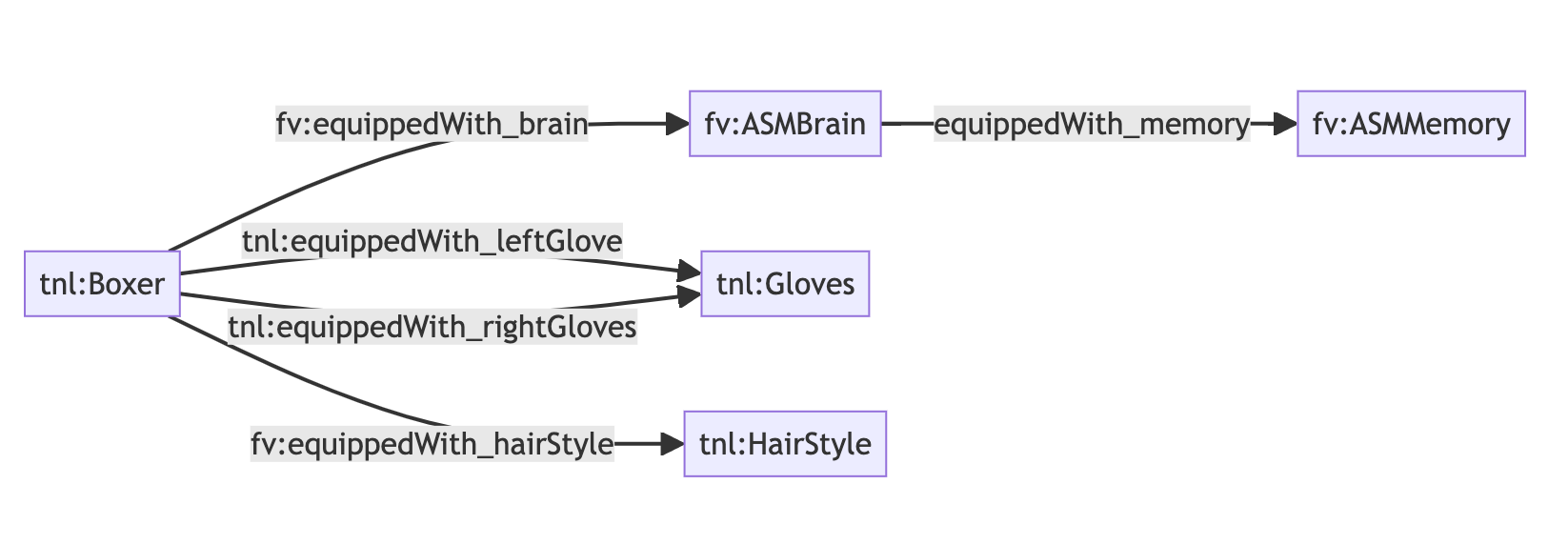
"@graph": [
{
"@id": "did:fv-asset:1:evm:0x6bca6de2dbdc4e0d41f7273011785ea16ba47182:1211",
"@type": "tnl:Boxer",
"fv:equippedWith_brain": {
"@id": "did:fv-asset:1:evm:0xd0318da435dbce0b347cc6faa330b5a9889e3585:1211"
},
"fv:equippedWith_hairStyle": {
"@id": "did:fv-asset:off-chain:60163ecf-ae7b-4eb5-a78c-31d825322613:2:2"
},
"tnl:equippedWith_leftGlove": {
"@id": "did:fv-asset:7668:10420:2"
},
"tnl:equippedWith_rightGlove": {
"@id": "did:fv-asset:7668:10420:1"
}
},
{
"@id": "did:fv-asset:1:evm:0xd0318da435dbce0b347cc6faa330b5a9889e3585:1211",
"@type": "fv:ASMBrain",
"fv:equippedWith_memory": {
"@id": "did:fv-asset:off-chain:60163ecf-ae7b-4eb5-a78c-31d825322613:1:10"
}
},
{
"@id": "did:fv-asset:off-chain:60163ecf-ae7b-4eb5-a78c-31d825322613:1:10",
"@type": "fv:ASMMemory"
},
{
"@id": "did:fv-asset:off-chain:60163ecf-ae7b-4eb5-a78c-31d825322613:2:2",
"@type": "tnl:HairStyle"
},
{
"@id": "did:fv-asset:7668:10420:1",
"@type": "tnl:Glove",
},
{
"@id": "did:fv-asset:7668:10420:2",
"@type": "tnl:Glove",
}
]
}
```
#### Visualisation
## GraphQL Query
```graphql
query GetAssetTree($input: AssetTreeInput!) {
getAssetTree(input: $input) {
... on AssetTreeResultSuccess {
data
}
... on AssetTreeResultFailure {
errors {
message
}
}
}
}
```
```json
{
"input": {
"tokenId": "1000",
"collection": {
"chainType": "evm",
"location": "0x6bca6de2dbdc4e0d41f7273011785ea16ba47182",
"chainId": 1
}
}
}
```
Where,
* `tokenId` - The token ID of the NFT you want the asset tree for
* `collection.chainType` - Either `evm` or `root` to specify where the asset lives on The Root Network we have both EVM (`evm`) and native substrate (`root`) storage, so this specifies where to look
* `collection.location` - The location of the NFT, this is either a contract address if the `chainType` is `evm` or a collection ID (number) if the `chainType` is `root`
* `collection.chainId` - The Chain ID of the blockchain the asset lives on
# How it works
Source: https://docs.therootnetwork.com/asset-register/how-it-works
## Schemas
Schemas play a pivotal role in the Asset Register ecosystem. They exist within a specific namespace and provide a comprehensive description of an asset. The goal is to define the capabilities of an asset for linking, ensuring that any applications interacting with these assets can interpret and represent them correctly. These descriptions are crucial for seamless integration between various assets.
To achieve this, the Asset Register utilizes schemas. These schemas are registered both on-chain and off-chain through the Asset Register API. This process ensures that information about an asset's properties and compatibility with other assets (i.e. asset links) are globally accessible and permanently stored.
### Asset Schema
The Asset Schema is a detailed specification outlining the properties of an asset and its compatibility with other assets through asset links. These schemas should be stored in a globally accessible and permanent location. Moreover, they need to be registered against specific assets. The Asset Register facilitates the registration of these schemas, allowing Futureverse teams to store them on a dedicated namespace.
### Namespace
In the Asset Register, a namespace is a container for organizing and presenting schemas. It serves as a centralized mechanism to group related schemas together. This organizational approach is crucial for efficient management, preventing naming conflicts, and improving overall code organization. In the context of Futureverse, namespaces play a vital role in grouping schemas for internal use.
## Asset Linking
Asset linking is a fundamental activity within the Asset Register and is executed through transactions. This process is crucial for establishing relationships between different assets. Oracles actively monitor these transactions to ensure that asset links are consistent with the on-chain ownership of assets. This validation guarantees the integrity and accuracy of the linked assets.
## Ownership Resolution
Ensuring accurate ownership information within the Asset Register is paramount. The ownership status of assets correlates directly with user access. This correlation is vital for maintaining the security and integrity of the asset ecosystem. Ownership resolution mechanisms are in place to guarantee that asset ownership aligns with the specified user access.
## Transactions
Transactions are how actions are committed to the Asset Register. Assets are linked via transactions that are executed in an authenticated and unrepeatable manner. Every action, including those involving oracles, must be explicit. This ensures the security and transparency of the Asset Register, preventing unauthorized or duplicate actions.
# Introduction
Source: https://docs.therootnetwork.com/asset-register/introduction
The Asset Register is where you manage assets across applications in the open metaverse.
## Context
The Asset Register is a new ledger system and tool suite that enables developers to establish data parameters for their assets. It is a metadata repository that defines what an asset is, what an asset can do, and the various environments in which an asset can be applied.
Assets in web3 are currently restricted by their linear data composition. Each asset typically only has one corresponding metadata file and there is no way to create connections between assets in disparate ecosystems. Current systems tend to rely on specific chains, hindering asset relationships across different networks. Moreover, they primarily cater to on-chain assets, overlooking off-chain ones. Achieving interoperability for both types of assets across various applications is challenging.
The Asset Register addresses these challenges, and supports interesting use cases:
* Equipping accessories to assets across chains
* Linking user metadata to a collectible to show its provenance
* Managing which collections are compatible with which accessories
* Informing applications about what an object does and what engines it is compatible with
The Asset Register has three components: the Asset Register Core Ledger, the Asset Register API, and the Schema Management System, which sits on top for validation and is the main enabler of interoperability.
A good understanding of blockchain technology will help you comprehend how it works.
### Asset Register Core
The Asset Register Core is similar to layer 2 DLTs and built specifically for asset relationship management. The Asset Register Core facilitates the data relationships between assets and ultimately enables us to create rich, interoperable applications while still adhering to [Web3 design principles](https://www.web3designprinciples.com/) such as:
* Consistency
* Data transparency
The Core provides a blockchain-like transaction experience without the need for network consensus, resulting in improved performance and cost-effectiveness. A user can build relationships between assets using [Asset Linking](/asset-register/how-it-works#asset-linking) which are explicitly created and deleted via a signed [Asset Register Transaction](/asset-register/guides/asset-register-transaction). Transactions can succeed or fail and will emit events accordingly. We have built infrastructure to query transactions; a block explorer could effectively be built on top of this data.
#### Why transactions?
Good question!
* Users need to make decisions that are authenticated by their identity
* Actions must be changed together in a logical order to ensure the changes to the state are consistent
* Data needs to be readily available and accessible so that many applications can have the same source of truth
These are the same reasons blockchains are so good at what they do; every single state change is chained together consistently. We aren't reinventing the wheel. On the identity front, we leverage a user's FuturePass or other existing wallet for authentication. Delegated signing is also something we have scoped for.
#### No consensus...how do I trust it?
Unlike a regular consensus blockchain that allows you to create assets with corresponding values, the Asset Register is lighter weight. It does not manipulate ownership of assets, relying instead on on-chain activities for this. Since there is no direct value attached to the links created by the Asset Register, the requirement for high trust does not exist in the same way. We realize, however, that applications may ascribe value in the asset links, so the roadmap includes both decentralized data storage and validation of data oracles. This is being done to maximize decentralization and trust while ensuring user experience, cost, and performance are optimized.
### Asset Register API
The Asset Register API is used to interact with the Asset Register Core and the Schema Management System.
The API is used for **submitting transactions to the Asset Register Core**, **querying transaction results,** and, most importantly, viewing the [Asset Tree](/asset-register/terminology#asset-tree). Schema creation and registration also occur via this service, making it the platform for admin-level interactions by asset creators.
### Schema Management System
Schemas merely describe data. We aren't doing anything special here. There is also no requirement to use our Schema Management service, you can host your schemas anywhere you like for increased decentralisation.
Our Schema Management System is built to facilitate a seamless onboarding experience for asset creators. It is built using TTL (pronounced 'turtle') files and utilizes the SHACL shape schema to describe assets and their relationships.
The system handles the hosting of schemas on a domain under the relevant namespaces. Asset creators can create schemas to describe the assets and the Schema Management System will stitch together multiple schemas on the same namespace. This will be used by people and machines to validate data outputted by systems.
## What can it do?
* Create [Asset Linking](/asset-register/how-it-works#asset-linking) between assets that are either [On-Chain Asset](/asset-register/terminology#on-chain-asset) or [Off-Chain Asset](/asset-register/terminology#off-chain-asset)
* Generate an [Asset Tree](/asset-register/terminology#asset-tree) describing the links
* Emit events based on changes on the Asset Register
* Applications can subscribe to changes on the Asset Register **(WIP)**
# Terminology
Source: https://docs.therootnetwork.com/asset-register/terminology
The Asset Register documentation introduces new terminology to describe its usage. A brief review of this document before exploring guides will help you understand them better.
## On-Chain Asset
Assets that are created by a third party with the existence attested on a blockchain network supported by the Asset Register. The Asset Register can only interact with these assets through the interface provided by the smart contract or runtime module on the blockchain where the asset is located. Therefore, it is imperative that asset collections deployed on the respective networks adhere to the NFT specifications.
***
## Off-Chain Asset
Assets that are created by a third party and attested by the third party’s system. Therefore, the third party is the creator and has superuser access over all their off-chain assets. Each asset must be registered on the Asset Register and registered against a schema to be a valid off-chain asset.
***
## Asset Link
A link between two assets (parent and child) based on a relationship path e.g. `equippedWith_gloves`. The Asset Register uses these relationships to build the asset trees that describe an asset.
***
## Asset Schema
Describes the properties of an asset and its compatibility with other assets through asset links. Schemas should be stored in a globally accessible and permanent location and be registered against an asset. The Asset Register will provide internal Futureverse teams with the ability to store schemas on a Futureverse namespace.
### HairStyle Example
```mermaid
graph TD
tnl:HairStyle --> fv:HairStyle
fluf:HairStyle --> fv:HairStyle
fv:HairStyle --> fvp:OffChainSFTAsset
fvp:OffChainSFTAsset --> fvp:OffChainAsset
fv:HairStyle --> fvp:OnChainERC1155Asset
fvp:OnChainERC1155Asset --> fvp:OnChainAsset
```
### Turtle Syntax
Turtle syntax is used to create the schemas.
#### TNL Hair Style
```json
@prefix tnl: .
@prefix sh: .
@prefix fv: <[http://schema.futureverse.com/fv#nf](https://www.notion.so/RFC-NFT-Indexer-df40caae2efc4f45b35c5acd2f1aeb59?pvs=21)> .
@prefix rdf: .
tnl:HairStyle a rdf:Class, sh:NodeShape ;
sh:node fv:HairStyle .
```
#### FV Hair Style
```json
@prefix sh: .
@prefix fv: .
@prefix fvp: .
@prefix rdf: .
fv:HairStyle a rdf:Class, sh:NodeShape ;
sh:or (
[ sh:node fvp:OnChainERC1155Asset ]
[ sh:node fvp:OffChainSFTAsset ]
) .
```
## Asset Tree
Describes all the nested asset links for a given asset.
### Root Parent Asset
```mermaid
graph LR
tnl:Boxer --> |equippedWith_brain| fv:ASMBrain --> |equippedWith_memory| fv:ASMMemory
tnl:Boxer --> |equippedWith_gloves| tnl:Gloves
tnl:Boxer --> |equippedWith_hairStyle| tnl:HairStyle
tnl:Boxer --> |equippedWith_hairDye| tnl:HairDye
```
```json
{
"@context": {
"rdf": "http://www.w3.org/1999/02/22-rdf-syntax-ns#",
"schema": "http://schema.org/",
"tnl": "http://schema.futureverse.com/tnl#",
"fvp": "http://schema.futureverse.com/fvp#",
"fv": "http://schema.futureverse.com/fv#"
},
"@graph": [
{
"@id": "did:fv-asset:1:evm:0x6bca6de2dbdc4e0d41f7273011785ea16ba47182:1868",
"rdf:type": "tnl:Boxer",
"fvp:equippedWith_asmBrain": {
"@id": "did:fv-asset:1:evm:0xd0318da435dbce0b347cc6faa330b5a9889e3585:1211"
},
"fvp:equippedWith_hairStyle": {
"@id": "did:fv-asset:off-chain:0x854A3E045Ac44a7f4A1726AdAC576029135DFdA7:533"
},
"fvp:equippedWith_hairDye": {
"@id": "did:fv-asset:off-chain:0x854A3E045Ac44a7f4A1726AdAC576029135DFdA7:853"
},
"fvp:equippedWith_gloves": {
"@id": "did:fv-asset:1:evm:0x1ea66a857de297471bc12dd12d93853ff6617284:203"
}
},
{
"@id": "did:fv-asset:1:evm:0xd0318da435dbce0b347cc6faa330b5a9889e3585:1211",
"rdf:type": "fv:ASMBrain",
"equippedWith_memory": {
"@id": "did:fv-asset:off-chain:0x0d2aedB4D26A63143240AE655D6B22627ad9298f:345"
}
},
{
"@id": "did:fv-asset:off-chain:0x0d2aedB4D26A63143240AE655D6B22627ad9298f:345",
"rdf:type": "fv:ASMMemory"
},
{
"@id": "did:fv-asset:off-chain:0x854A3E045Ac44a7f4A1726AdAC576029135DFdA7:533",
"rdf:type": "tnl:HairStyle"
},
{
"@id": "did:fv-asset:off-chain:0x854A3E045Ac44a7f4A1726AdAC576029135DFdA7:853",
"rdf:type": "tnl:HairDye"
},
{
"@id": "did:fv-asset:1:evm:0x1ea66a857de297471bc12dd12d93853ff6617284:203",
"rdf:type": "tnl:Gloves"
}
]
}
```
### Nested Parent Asset
```mermaid
graph TD
fv:ASMBrain --> |equippedWith_memory| fv:ASMMemory
```
```json
{
"@context": {
"rdf": "http://www.w3.org/1999/02/22-rdf-syntax-ns#",
"schema": "http://schema.org/",
"fvp": "http://schema.futureverse.com/fvp#",
"fv": "http://schema.futureverse.com/fv#"
},
"@graph": [
{
"@id": "did:fv-asset:1:evm:0xd0318da435dbce0b347cc6faa330b5a9889e3585:1211",
"rdf:type": "fv:ASMBrain",
"equippedWith_memory": {
"@id": "did:fv-asset:off-chain:0x0d2aedB4D26A63143240AE655D6B22627ad9298f:345"
}
},
{
"@id": "did:fv-asset:off-chain:0x0d2aedB4D26A63143240AE655D6B22627ad9298f:345",
"rdf:type": "fv:ASMMemory"
}
]
}
```
# Connecting to The Root Network
Source: https://docs.therootnetwork.com/build/connecting-to-the-root-network
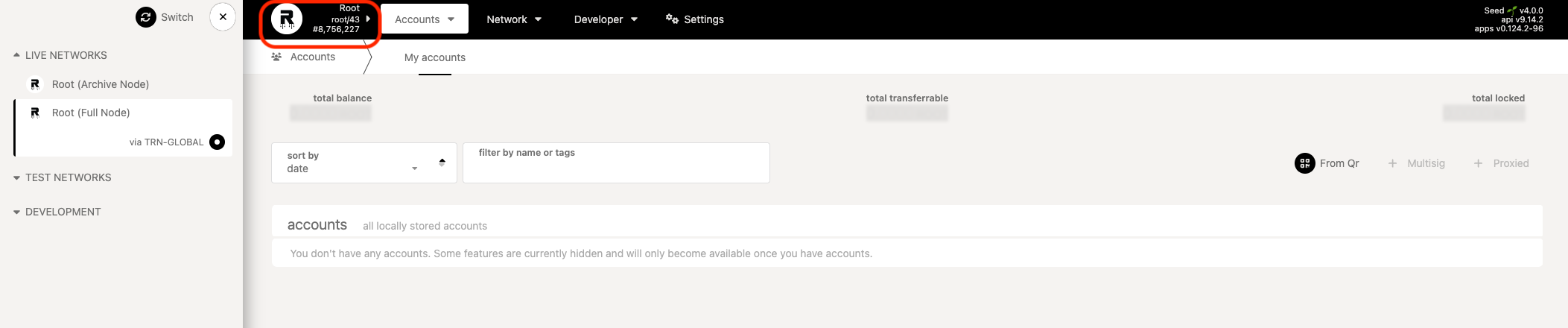
The simplest way to connect to one of the TRN networks is by using [The Root Network Portal](https://portal.rootnet.cloud/#/explorer). This web portal enables communication with a node through WebSocket. You can choose the network to connect to by selecting it from the **Root** dropdown in the top left corner and clicking **Switch**.
## Network Endpoints
When connecting to The Root Network through the API, you can choose to connect to a public web socket or a local node.
The Root Network RPC servers are not for sustained or business use, and they may become unavailable at anytime. You should run your node or use an RPC Service like Rootscan RPC for regular use.
### Root (Mainnet)
```md
wss://root.rootnet.live/archive/ws
```
```md
https://root.rootnet.live/archive
```
```md
https://rootscan.io
```
```md
7668
```
```md
XRP
```
### Porcini (Testnet)
```md
wss://porcini.rootnet.app/archive/ws
```
```md
https://porcini.rootnet.app/archive
```
```md
https://porcini.rootscan.io
```
```md
7672
```
```md
XRP
```
### Sprout-1 (Devnet)
```md
wss://porcini.devnet.rootnet.app/ws
```
```md
https://porcini.devnet.rootnet.app
```
```md
https://devnet-porcini.rootscan.io/
```
```md
17672
```
```md
XRP
```
# How do I deploy a smart contract on The Root Network using hardhat?
Source: https://docs.therootnetwork.com/build/evm/cookbook/smart-contract
The code below is the minimum `hardhat` configuration to deploy smart contracts on The Root Network.
```
import { getPublicProviderUrl } from "@therootnetwork/evm";
const config: HardhatUserConfig = {
solidity: {
version: "0.8.17",
},
networks: {
porcini: {
url: getPublicProviderUrl("porcini"),
chainId: 7672,
accounts: [...],
},
root: {
url: getPublicProviderUrl("root"),
chainId: 7668,
accounts: [...],
},
},
};
```
# Tokens
Source: https://docs.therootnetwork.com/build/evm/cookbook/tokens
## ERC-20
### How do I transfer `ROOT` token?
ROOT token contract address is `0xcCcCCccC00000001000000000000000000000000` and it fully supports the ERC-20 standard.
```ts
import { Contract, utils } from "ethers";
import { ERC20_PRECOMPILE_ABI } from "@therootnetwork/evm";
const ROOT_ADDRESS = "0xcCcCCccC00000001000000000000000000000000";
const wallet = new Wallet(...);
const contract = new Contract(ROOT_ADDRESS, ERC20_PRECOMPILE_ABI);
const oneROOT = utils.parseUnits(1, 6);
// transfer 1 ROOT to Alice
await contract.connect(wallet).transfer("0xE04CC55ebEE1cBCE552f250e85c57B70B2E2625b", oneROOT);
```
ROOT token has **6 decimals** and its ID is `1`.
### How do I transfer `XRP` token or any other ERC-20 tokens?
Just like the ROOT token, XRP and any other ERC-20 token contract addresses can be derived from its native asset IDs.
```ts
import { Contract, utils } from "ethers";
import { ERC20_PRECOMPILE_ABI, assetIdToERC20Address } from "@therootnetwork/evm";
const XRP_ID = 2;
const XRP_ADDRESS = assetIdToERC20Address(2);
const wallet = new Wallet(...);
const contract = new Contract(XRP_ADDRESS, ERC20_PRECOMPILE_ABI, wallet);
const oneXRP = utils.parseUnits(1, await contract.decimals());
// transfer 1 ROOT to Alice
await contract.connect(wallet).transfer("0xE04CC55ebEE1cBCE552f250e85c57B70B2E2625b", oneXRP);
```
**Tip**: \
To retrieve a list of available tokens and their asset IDs, check out the Tokens section in our [Rootscan Explorer](../../connecting-to-the-root-network).
## ERC-721
### How do I create and mint an ERC-721 NFT?
It's possible to create an ERC-712 collection by calling `initializeCollection()` method exposed by the [`nft` precompile](../runtime-precompiles/nft-erc-721).
```ts
import { Contract, utils } from "ethers";
import { NFT_PRECOMPILE_ABI, NFT_PRECOMPILE_ADDRESS } from "@therootnetwork/evm";
const wallet = new Wallet(...);
const contract = new Contract(NFT_PRECOMPILE_ADDRESS, NFT_PRECOMPILE_ABI);
const tx = await contract.connect(wallet).initializeCollection(
wallet.address, // owner address
utils.toUtf8Bytes("My Collection"), // collection name
BigNumber.from(0), // no max issuance
utils.toUtf8Bytes("https://example.com/nft/metadata/"), // metadataPath
[wallet.address], // royaltyAddresses
[100_000], // royaltyEntitlements
);
const receipt = await tx.wait();
const collectionAddress = (receipt?.events as any)[0].args.precompileAddress;
```
**Caution**:
The `royaltyEntitlements` is in permill (parts per million) scaling, so if you want a 10% royalty, that would be `100,000` (as `(100_000 / 1_000_000) * 100 = 10%`).
Once the collection is created, use the same `owner` wallet to mint the NFT:
```ts
import { Contract, utils } from "ethers";
import { ERC721_PRECOMPILE_ABI } from "@therootnetwork/evm";
const wallet = new Wallet(...);
const contract = new Contract(collectionAddress, ERC721_PRECOMPILE_ABI);
// Mint 1 NFT for Alice
await contract.connect(wallet).mint("0xE04CC55ebEE1cBCE552f250e85c57B70B2E2625b", 1);
```
# Building with EVM API
Source: https://docs.therootnetwork.com/build/evm/ethereum-vs-trn
## Dual Token
The Root Network uses a dual token system - governance token ROOT and a fee token XRP. The native currency used by Ethereum RPCs on The Root Network for balances, paying gas fees, and value transfers is XRP.
XRP is a 6dp token, while Ethereum tooling like MetaMask and Solidity expect native token amounts in wei or 18dp units. To keep compatibility simple, The Root Network protocol takes care of scaling inputs down by `1e-12` and scaling up outputs by `1e12`. Any fractional amounts \< `1e12` / `0.000001 XRP` are always rounded up only by adding `1e12`.
ROOT token is available as an ERC-20 token at `0xcCcCCccC00000001000000000000000000000000`. ROOT is also a 6dp token but requires no special handling as per the ERC20 standard.
Tip: The `@therootnetwork/evm` package exports a handy method `assetIdToERC20Address` that converts the native asset id to EVM contract address. In ROOT case, it's effectively `assetIdToERC20Address(1)` with ROOT asset id is `1`.
### Transfer Examples
1. Transfers `1 XRP` to `receiver`
```
receiver.call{value: 1 ether}("")
```
1. Transfers `1.00001 XRP` to `receiver` (i.e. rounds up by `0.00001 XRP`)
```
receiver.call{value: 1 ether + 1 wei}("")
```
Similarly, the following will transfer `0.00001 XRP` to `receiver`
```
await wallet.sendTransaction({
to: receiver,
value: 1,
});
```
or transfer `1.2 XRP` to `receiver`
```
await wallet.sendTransaction({
to: receiver,
value: ethers.utils.parseEther("1.2"),
});
```
Recap:
* XRP is the default "native" currency
* Input and output amounts for XRP on EVM are expressed in `wei` (18dp) as normal
* Amounts transferred `< 1e12` are always rounded up
## Transaction Fees
The Root Network supports EIP-1559 and legacy transaction fee models. Ethereum tooling is able to query fee estimation info accurately out of the box without any special handling required. The `eth_feeHistory` RPC is provided for this purpose. See eth\_feeHistory - Ethereum [documentation](https://docs.alchemy.com/alchemy/apis/ethereum/eth_feehistory) for more details.
Fees are charged for deploying and executing smart contracts on The Root Network.
Executing a smart contract on The Root Network costs a minimal transaction fee, typically a few XRPs.
Deploying a smart contract is slightly more expensive than executing it. This is because each contract deployed to the EVM will be stored on the chain forever. It requires storage space.
## Addresses
EVM contract developers on The Root Network can use existing Ethereum wallets and addresses without any changes. The network supports ECDSA addresses by default.
## Solidity Version
The Root Network supports Solidity version `v8.20.0 (Shanghai)` and below, with future support for newer version is underway.
# Install EVM API
Source: https://docs.therootnetwork.com/build/evm/evm-package
## @therootnetwork/evm
A utility [package](https://www.npmjs.com/package/@therootnetwork/evm) that simplifies EVM development on The Root Network.
## Install
```
yarn add @therootnetwork/evm
```
## Usage
Import and initialize the functionalities you need:
```
import {
collectionIdToERC721Address,
ERC721_PRECOMPILE_ABI,
getPublicProviderUrl,
} from "@therootnetwork/evm";
import { Contract, getDefaultProvider } from "ethers";
const collectionAddress = collectionIdToERC721Address(1);
const providerUrl = getPublicProviderUrl("porcini");
const provider = getDefaultProvider(providerUrl);
const contract = new Contract(collectionAddress, ERC721_PRECOMPILE_ABI, provider);
```
## API
### `function assetIdToERC20Address(assetId: string | number)`
Converts native asset ID to ERC-20 contract address
### `function collectionIdToERC721Address(collectionId: string | number)`
Converts native NFT collection ID to ERC-721 contract address
### `function getPublicProviderUrl(network: NetworkName): HttpProviderUrl`
Returns the Public RPC URls for the corresponding `network`
## Constants
### Addresses
Constant
Description
Address
`NFT_PRECOMPILE_ADDRESS: string`
Precompile address for `nft` pallet
`0x00000000000000000000000000000000000006b9`
`SFT_PRECOMPILE_ADDRESS: string`
Precompile address for `sft` pallet
`0x00000000000000000000000000000000000006c3`
`FUTUREPASS_REGISTRAR_PRECOMPILE_ADDRESS: string`
Precompile address for `futurepass` pallet
`0x000000000000000000000000000000000000FFFF`
`PEG_PRECOMPILE_ADDRESS: string`
Precompile address for `erc20Peg` and `nftPeg` pallets
`0x0000000000000000000000000000000000000793`
`DEX_PRECOMPILE_ADDRESS: string`
Precompile address for `dex` pallet
`0x000000000000000000000000000000000000DdDD`
`FEE_PROXY_PRECOMPILE_ADDRESS`
Precompile address for `feeProxy` pallet
`0x00000000000000000000000000000000000004BB`
**Info**: The precompile addresses are identical across all networks, including Mainnet, Devnet, and Porcini.
### ABIs
Constant
Description
`ERC20_ABI: string[]`
ABI for the ERC-20 standard
`ERC721_ABI: string[]`
ABI for the ERC-721 standard
`ERC1155_ABI: string[]`
ABI for the ERC-1155 standard
`NFT_PRECOMPILE_ABI: string[]`
ABI for the `nft` pallet
`SFT_PRECOMPILE_ABI: string[]`
ABI for the `sft` pallet
`FEE_PROXY_PRECOMPILE_ABI: string[]`
ABI for `feeProxy` pallet
`FUTUREPASS_PRECOMPILE_ABI: string[]`
ABI for `futurepass` account
`FUTUREPASS_REGISTRAR_PRECOMPILE_ABI: string[]`
ABI for `futurepass` pallet
`DEX_PRECOMPILE_ABI: string[]`
ABI for the `dex` pallet
**Note**: All exported ABIs are in human-readable format.
# Assets (ERC-20)
Source: https://docs.therootnetwork.com/build/evm/runtime-precompiles/assets-erc-20
## Asset Precompile
### Contract Address
The ERC-20 contract address for The Root Network native tokens uses the following format:
```
0xCCCCCCCC[4-byte-token-id]000000000000000000000000
```
To make things easier, the `@therootnetwork/evm` provides a handy function to convert token asset ID to its equivalent contract address.
```
import { assetIdToERC20Address } from "@therootnetwork/evm";
const ROOT_ASSET_ID = 1;
const ROOT_CONTRACT_ADDRESS = assetIdToERC20Address(ROOT_ASSET_ID);
```
### Solidity Interfaces
```
interface IERC165 {
function supportsInterface(bytes4 interfaceId) external view returns (bool);
}
```
```
interface IERC20 is IERC165 {
event Transfer(address indexed from, address indexed to, uint256 value);
event Approval(address indexed owner, address indexed spender, uint256 value);
function totalSupply() external view returns (uint256);
function balanceOf(address account) external view returns (uint256);
function transfer(address to, uint256 amount) external returns (bool);
function allowance(address owner, address spender) external view returns (uint256);
function approve(address spender, uint256 amount) external returns (bool);
function transferFrom(address from, address to, uint256 amount) external returns (bool);
}
```
```
interface IERC20Metadata is IERC20 {
function name() external view returns (string memory);
function symbol() external view returns (string memory);
function decimals() external view returns (uint8);
}
```
# Decentralized Exchange
Source: https://docs.therootnetwork.com/build/evm/runtime-precompiles/decentralized-exchange
## Pallet Precompile
### Contract Address
```
0x000000000000000000000000000000000000DdDD
```
### Solidity Interfaces
```
interface IUniswapV2Pair {
event Mint(address indexed sender, uint amount0, uint amount1);
event Burn(address indexed sender, uint amount0, uint amount1, address indexed to);
event Swap(
address indexed sender,
uint amount0In,
uint amount1In,
uint amount0Out,
uint amount1Out,
address indexed to
);
}
```
```
interface IUniswapV2Router01 {
function addLiquidity(
address tokenA,
address tokenB,
uint amountADesired,
uint amountBDesired,
uint amountAMin,
uint amountBMin,
address to,
uint deadline
) external returns (uint amountA, uint amountB, uint liquidity);
function addLiquidityETH(
address token,
uint amountTokenDesired,
uint amountTokenMin,
uint amountETHMin,
address to,
uint deadline
) external payable returns (uint amountToken, uint amountETH, uint liquidity);
function removeLiquidity(
address tokenA,
address tokenB,
uint liquidity,
uint amountAMin,
uint amountBMin,
address to,
uint deadline
) external returns (uint amountA, uint amountB);
function removeLiquidityETH(
address token,
uint liquidity,
uint amountTokenMin,
uint amountETHMin,
address to,
uint deadline
) external returns (uint amountToken, uint amountETH);
function swapExactTokensForTokens(
uint amountIn,
uint amountOutMin,
address[] calldata path,
address to,
uint deadline
) external returns (uint[] memory amounts);
function swapTokensForExactTokens(
uint amountOut,
uint amountInMax,
address[] calldata path,
address to,
uint deadline
) external returns (uint[] memory amounts);
function swapExactETHForTokens(uint amountOutMin, address[] calldata path, address to, uint deadline)
external
payable
returns (uint[] memory amounts);
function swapTokensForExactETH(uint amountOut, uint amountInMax, address[] calldata path, address to, uint deadline)
external
returns (uint[] memory amounts);
function swapExactTokensForETH(uint amountIn, uint amountOutMin, address[] calldata path, address to, uint deadline)
external
returns (uint[] memory amounts);
function swapETHForExactTokens(uint amountOut, address[] calldata path, address to, uint deadline)
external
payable
returns (uint[] memory amounts);
function quote(uint amountA, uint reserveA, uint reserveB) external pure returns (uint amountB);
function getAmountOut(uint amountIn, uint reserveIn, uint reserveOut) external pure returns (uint amountOut);
function getAmountIn(uint amountOut, uint reserveIn, uint reserveOut) external pure returns (uint amountIn);
function getAmountsOut(uint amountIn, address[] calldata path) external view returns (uint[] memory amounts);
function getAmountsIn(uint amountOut, address[] calldata path) external view returns (uint[] memory amounts);
}
```
# FeeProxy
Source: https://docs.therootnetwork.com/build/evm/runtime-precompiles/feeproxy
## Pallet Precompile
### Contract Address
```
0x00000000000000000000000000000000000004bb
```
### Solidity Interfaces
```
interface FeeProxy {
function callWithFeePreferences(address asset, uint128 maxPayment, address target, bytes input)
}
```
# FuturePass
Source: https://docs.therootnetwork.com/build/evm/runtime-precompiles/futurepass
## Pallet Precompile
Use this precompile to interact with the `futurepass` runtime pallet to create a FuturePass account.
### Contract Address
```
0x000000000000000000000000000000000000FFFF
```
### Solidity Interfaces
```
interface FuturePassRegistrar {
event FuturepassCreated(address indexed futurepass, address owner);
function futurepassOf(address owner) external view returns (address);
function create(address owner) external returns (address);
}
```
## FuturePass Account
### Contract Address
The FuturePass account addresses for The Root Network use the following format:
```
0xFFFFFFFF[16-byte-futurepass-id]
```
### Solidity Interfaces
```
interface FuturePass {
event FuturepassDelegateRegistered(address indexed futurepass, address indexed delegate, uint8 proxyType);
event FuturepassDelegateUnregistered(address indexed futurepass, address delegate);
event Executed(uint8 indexed callType, address indexed target, uint256 indexed value, bytes4 data);
event ContractCreated(uint8 indexed callType, address indexed contractAddress, uint256 indexed value, bytes32 salt);
function delegateType(address delegate) external view returns (uint8);
function registerDelegate(address delegate, uint8 proxyType) external;
function unregisterDelegate(address delegate) external;
function proxyCall(uint8 callType, address callTo, uint256 value, bytes memory callData) external payable;
}
```
```
interface Ownable {
event OwnershipTransferred(address indexed previousOwner, address indexed newOwner);
function owner() external view returns (address);
function renounceOwnership() external;
function transferOwnership(address owner) external;
}
```
# NFT (ERC-721)
Source: https://docs.therootnetwork.com/build/evm/runtime-precompiles/nft-erc-721
## Pallet Precompile
Use this precompile to interact with the `nft` runtime pallet to create an ERC-721 collection.
### Contract Address
```
0x00000000000000000000000000000000000006b9
```
### Solidity Interfaces
```
interface TRNNFT {
event InitializeCollection(address indexed collectionOwner, address precompileAddress);
function initializeCollection(address owner, bytes calldata name, uint32 maxIssuance, bytes calldata metadataPath, address[] calldata royaltyAddresses, uint32[] calldata royaltyEntitlements) external returns (address, uint32);
}
```
## Token Precompile
### Contract Address
The ERC-721 contract address for The Root Network native non-fungible token uses the following format:
```
0xAAAAAAAA[4-byte-collection-id]000000000000000000000000
```
To make things easier, the `@therootnetwork/evm` provides a handy function to convert token asset ID to its equivalent contract address.
```
import { collectionIdToERC721Address } from "@therootnetwork/evm";
const COLLECTION_ID = 1;
const COLLECTION_CONTRACT_ADDRESS = collectionIdToERC721Address(COLLECTION_ID);
```
### Solidity Interfaces
```
interface IERC165 {
function supportsInterface(bytes4 interfaceId) external view returns (bool);
}
```
```
interface IERC721 is IERC165 {
event Transfer(address indexed from, address indexed to, uint256 indexed tokenId);
event Approval(address indexed owner, address indexed approved, uint256 indexed tokenId);
event ApprovalForAll(address indexed owner, address indexed operator, bool approved);
function balanceOf(address owner) external view returns (uint256 balance);
function ownerOf(uint256 tokenId) external view returns (address owner);
function safeTransferFrom(address from, address to, uint256 tokenId) external;
function transferFrom(address from, address to, uint256 tokenId) external;
function approve(address to, uint256 tokenId) external;
function getApproved(uint256 tokenId) external view returns (address operator);
function setApprovalForAll(address operator, bool _approved) external;
function isApprovedForAll(address owner, address operator) external view returns (bool);
function safeTransferFrom(address from,address to,uint256 tokenId,bytes calldata data) external;
}
```
```
interface IERC721Metadata is IERC721 {
function name() external view returns (string memory);
function symbol() external view returns (string memory);
function tokenURI(uint256 tokenId) external view returns (string memory);
}
```
```
interface IERC721Burnable is IERC721 {
function burn(uint256 tokenId) external;
}
```
```
interface TRN721 is IERC165 {
event MaxSupplyUpdated(uint32 maxSupply);
event BaseURIUpdated(string baseURI);
event PublicMintToggled(bool indexed enabled);
event MintFeeUpdated(address indexed paymentAsset, uint256 indexed mintFee);
function totalSupply() external view returns (uint256);
function mint(address owner, uint32 quantity) external;
function setMaxSupply(uint32 maxSupply) external;
function setBaseURI(bytes calldata baseURI) external;
function ownedTokens(address who, uint16 limit, uint32 cursor) external view returns (uint32, uint32, uint32[] memory);
function togglePublicMint(bool enabled) external;
function setMintFee(address paymentAsset, uint256 mintFee) external;
}
```
```
interface IERC5484 is IERC165 {
enum BurnAuth { IssuerOnly, OwnerOnly, Both, Neither };
event Issued(address indexed from, address indexed to, uint256 indexed tokenId, BurnAuth burnAuth);
function burnAuth(uint256 tokenId) external view returns (BurnAuth);
}
```
```
interface Ownable is IERC165 {
event OwnershipTransferred(address indexed previousOwner, address indexed newOwner);
function owner() external view returns (address);
function renounceOwnership() external;
function transferOwnership(address owner) external;
}
```
### Soulbound Tokens
The ERC721 precompile supports Soulbound token functionality and implements
the IERC5484 interface.
```
enum BurnAuth { IssuerOnly, OwnerOnly, Both, Neither };
```
Soulbound token ABI
```
"event PendingIssuanceCreated(address indexed to, uint256 issuanceId, uint256 quantity, uint8 burnAuth)",
"event Issued(address indexed from, address indexed to, uint256 indexed tokenId, uint8 burnAuth)",
"function issueSoulbound(address,uint32,uint8)",
"function acceptSoulboundIssuance(uint32)",
"function pendingIssuances(address) external view returns (uint256[] issuanceIds memory, (uint256 quantity, uint8 burnAuth)[] issuances memory)",
"function burnAuth(uint256) external view returns (uint8)",
```
The minting of Soulbound tokens is a two-step process. The collection owner creates
a pending issuance via `issueSoulbound`, and states the `burn authority` on this call.
The token is only minted once the token owner calls `acceptSoulbound`.
```
// create a pending issuance as the collection owner
await erc721Precompile
.connect(collectionOwner)
.issueSoulbound(
tokenOwner.address, // token owner
5, // quantity
BurnAuth.Both // burn authority
)
.then(tx => tx.wait());
// query all pending issuances for the token owner
const [issuanceIds, issuances] = await erc721Precompile.pendingIssuances(tokenOwner.address);
// accept pending issuance as token owner
await erc721Precompile
.connect(tokenOwner)
.acceptSoulboundIssuance(issuanceIds[0])
.then(tx => tx.wait());
```
# SFT (ERC-1155)
Source: https://docs.therootnetwork.com/build/evm/runtime-precompiles/sft-erc-1155
## Pallet Precompile
Use this precompile to interact with the `sft` runtime pallet to create an ERC-1155 collection.
### Contract Address
```
0x00000000000000000000000000000000000006c3
```
### Solidity Interfaces
```
interface TRNSFT {
event InitializeSftCollection(address indexed collectionOwner, address indexed precompileAddress);
function initializeCollection(address owner, bytes calldata name, bytes calldata metadataPath, address[] calldata royaltyAddresses, uint32[] calldata royaltyEntitlements) external returns (address, uint32);
}
```
## Token Precompile
## Contract Address
The ERC-1155 contract address for The Root Network native semi-fungible tokens uses the following format:
```
0xBBBBBBBB[4-byte-collection-id]000000000000000000000000
```
To make things easier, the `@therootnetwork/evm` provides a handy function to convert token asset ID to its equivalent contract address.
```
import { collectionIdToERC1155Address } from "@therootnetwork/evm";
const COLLECTION_ID = 1;
const COLLECTION_CONTRACT_ADDRESS = collectionIdToERC1155Address(COLLECTION_ID);
```
### Solidity Interfaces
```
interface IERC165 {
function supportsInterface(bytes4 interfaceId) external view returns (bool);
}
```
```
interface IERC1155 is IERC165 {
event TransferSingle(address indexed operator, address indexed from, address indexed to, uint256 id, uint256 value);
event TransferBatch(address indexed operator, address indexed from, address indexed to, uint256[] ids, uint256[] values);
event ApprovalForAll(address indexed account, address indexed operator, bool approved);
function balanceOf(address owner, uint256 id) external view returns (uint256);
function balanceOfBatch(address[] calldata owners, uint256[] calldata ids) external view returns (uint256[] memory);
function setApprovalForAll(address operator, bool approved) external;
function isApprovedForAll(address account, address operator) external view returns (bool);
function safeTransferFrom(address from, address to, uint256 id, uint256 amount, bytes calldata data) external;
function safeBatchTransferFrom(address from, address to, uint256[] calldata ids, uint256[] calldata amounts, bytes calldata data) external;
}
```
```
interface IERC1155Burnable is IERC1155 {
function burn(address account, uint256 id, uint256 value) external;
function burnBatch(address account, uint256[] calldata ids, uint256[] calldata values) external;
}
```
```
interface IERC1155Supply is IERC1155 {
function totalSupply(uint256 id) external view returns (uint256);
function exists(uint256 id) external view returns (bool);
}
```
```
interface IERC1155MetadataURI is IERC1155 {
function uri(uint256 id) external view returns (string memory);
}
```
```
interface TRN1155 is IERC165 {
event TokenCreated(uint32 indexed serialNumber);
event MaxSupplyUpdated(uint128 indexed maxSupply);
event BaseURIUpdated(string baseURI);
event PublicMintToggled(uint256 id, bool indexed enabled);
event MintFeeUpdated(uint256 id, address indexed paymentAsset, uint256 indexed mintFee);
function createToken(bytes calldata name, uint128 initialIssuance, uint128 maxIssuance, address tokenOwner) external returns (uint32);
function mint(address owner, uint256 id, uint256 amount) external;
function mintBatch(address owner, uint256[] calldata ids, uint256[] calldata amounts) external;
function setMaxSupply(uint256 id, uint32 maxSupply) external;
function setBaseURI(bytes calldata baseURI) external;
function togglePublicMint(uint256 id, bool enabled) external;
function setMintFee(uint256 id, address paymentAsset, uint256 mintFee) external;
}
```
```
interface Ownable is IERC165 {
event OwnershipTransferred(address indexed previousOwner, address indexed newOwner);
function owner() external view returns (address);
function renounceOwnership() external;
function transferOwnership(address owner) external;
}
```
### Soulbound Tokens
The ERC1155 precompile supports Soulbound token functionality and implements
the IERC5484 interface.
```
enum BurnAuth { IssuerOnly, OwnerOnly, Both, Neither };
```
Soulbound token ABI
```
"event PendingIssuanceCreated(address indexed to, uint256 issuanceId, uint256[] tokenIds, uint256[] balances)",
"event Issued(address indexed from, address indexed to, uint256 indexed tokenId, uint8 burnAuth)",
"function setBurnAuth(uint256,uint8)",
"function issueSoulbound(address,uint256[],uint256[])",
"function acceptSoulboundIssuance(uint32)",
"function pendingIssuances(address) external view returns (uint256[] memory,(uint256[] memory,uint256[] memory,uint8[] memory)[] memory)",
"function burnAuth(uint256) external view returns (uint8)",
"function burnAsCollectionOwner(address,uint256[],uint256[])",
```
The minting of Soulbound tokens is a two-step process. The collection owner creates
a pending issuance via `issueSoulbound`. However the `burn authority` for a token
must already be set prior to calling `issueSoulbound`.
The token is only minted once the token owner calls `acceptSoulbound`.
```
// set the burn auth for a token
await erc1155Precompile
.connect(collectionOwner)
.setBurnAuth(token, BurnAuth.TokenOwner).then(tx => tx.wait());
// issue a token as collection owner
await erc1155Precompile
.connect(collectionOwner)
.issueSoulbound(
tokenOwner.address, // token owner
[token], // list of token ids
[1] // quantities for each token
).then((tx: any) => tx.wait());
// fetch all pending issuances
const [issuanceIds, issuances] = await erc1155Precompile.pendingIssuances(tokenOwner.address);
// accept pending issuance as token owner
await erc1155Precompile
.connect(tokenOwner)
.acceptSoulboundIssuance(issuanceIds[0])
.then(tx => tx.wait());
```
# Curated Examples
Source: https://docs.therootnetwork.com/build/examples
Explore real-world use cases and examples to help you get started quickly.
# Getting Started
Source: https://docs.therootnetwork.com/build/getting-started
Root Network is a public blockchain network built on [Substrate](https://substrate.io/), a general-purpose blockchain framework that provides the essential building blocks for blockchain logic. Whether you're new to blockchain development or experienced in the space, The Root Network simplifies dapp development through pre-built modules, runtime pallets, and seamless integration with Ethereum tooling.
## Runtime Pallets
The Root Network makes dapp development easy via pre-built [runtime modules](/build/substrate/api-reference/runtime-pallets). These work a bit like plug-and-play components that sit within the blockchain's runtime. Developers can leverage these core pallets, rather than having to code their own essential parts from scratch. Developers can opt to use all, some, or none of these modules within their dapps.
## Ethereum VM Layer
One of the core runtime pallets provided by The Root Network is the [`evm` pallet](/build/evm/runtime-precompiles), which provides the environment to deploy and run Ethereum Smart Contracts natively on The Root Network. This gives web3 developers access to smart contract functionality and also means that any code previously written for Ethereum can now run on The Root Network blockchain with minimal changes.
The Root Network also exposes functionalities of certain pallets as "precompiles", which allows users/tooling to query/transact with the pallet functions as if they are Solidity functions. This allows native network currencies and NFTs to appear as regular ERC-20s and ERC-721s to Ethereum tooling and contracts alongside other functionality to supercharge contract development, such as Decentralised Exchange (DEX), ERC-1155.
## Native API vs EVM API
When building a dapp on The Root Network, developers have the option to either utilize the native Native API, which interacts with the runtime pallets, or they can choose to use the EVM API, which is compatible with several well-known libraries such as `ethers.js`.
### What are the pros and cons of each approach?
* The native Native API offers the best efficiency and lower costs than smart contracts. This is because the runtime pallets are written in Rust and are highly optimized. Using the runtime pallets also saves development time because the functionalities are easily accessible through a simple JavaScript API. When designing a new dapp, we recommend searching through the pallets first to check if the problem you are addressing has already been sorted by the provided functionalities.
* The EVM pallet and smart contracts offer more flexibility. You can create your custom logic and deploy it at any time. You can also use Solidity (The latest version we support is 0.8.17) and other tools that you may be more familiar with.
## Installation
To get started with building on The Root Network, you’ll need to install the appropriate tools depending on whether you're using the Native API or the EVM API. Follow the steps in the provided documentation to correctly set up your development environment.
* [Install Native API](/build/substrate/api-package)
* [Install EVM API](/build/evm/evm-package)
# Mainnet Rootscan Explorer
Source: https://docs.therootnetwork.com/build/rootscan-explorer
Track transactions and activity on The Root Network mainnet.
# Install Native API
Source: https://docs.therootnetwork.com/build/substrate/api-package
## @therootnetwork/api
A utility package that complements the [`@polkadot/api`](https://www.npmjs.com/package/@polkadot/api) to connect and interact with the Root Network node.
## Install
```ts
yarn add @polkadot/api @therootnetwork/api
yarn add -D @therootnetwork/api-types # optional, for Typescript support
```
## Usage
1. Create an API instance
```ts
import "@therootnetwork/api-types"; // optional, for Typescript support
import { ApiPromise } from "@polkadot/api";
import { getApiOptions, getPublicProvider } from "@therootnetwork/api";
const api = await ApiPromise.create({
...getApiOptions(),
...getPublicProvider("root"),
});
```
1. Use `api` instance to interact with node
```ts
// query and display account data
const data = await api.query.system.account("0xE04CC55ebEE1cBCE552f250e85c57B70B2E2625b");
console.log(data.toHuman());
```
## API
### `function getApiOptions()`
Returns an `ApiOptions` object that contains necessary types and RPC methods to connect The Root Network.
### `function getPublicProvider(network: NetworkName, useWsProvider?: boolean)`
Returns a `provider` instance of either `WsProvider` or `HttpProvider` that connects to TRN mainnet `"root"` or testnet `"porcini"`.
# JSON-RPC
Source: https://docs.therootnetwork.com/build/substrate/api-reference/json-rpc
## Author
### `hasKey`
Returns true if the keystore has private keys for the given public key and key type.
This method is only active with appropriate flags.
**Interface**
```ts
api.rpc.author.hasKey(publicKey: Bytes, keyType: Text): bool
```
**JSON**
```ts
{ "id":1, "jsonrpc":"2.0", "method":"author_hasKey", "params":[publicKey: Bytes, keyType: Text] }
```
### `hasSessionKeys`
Returns true if the keystore has private keys for the given session public keys.
This method is only active with appropriate flags.
**Interface**
```ts
api.rpc.author.hasSessionKeys(sessionKeys: Bytes): bool
```
**JSON**
```ts
{ "id":1, "jsonrpc":"2.0", "method":"author_hasSessionKeys", "params":[sessionKeys: Bytes] }
```
### `insertKey`
Insert a key into the keystore.
This method is only active with appropriate flags.
**Interface**
```ts
api.rpc.author.insertKey(keyType: Text, suri: Text, publicKey: Bytes): Bytes
```
**JSON**
```ts
{ "id":1, "jsonrpc":"2.0", "method":"author_insertKey", "params":[keyType: Text, suri: Text, publicKey: Bytes] }
```
### `pendingExtrinsics`
Returns all pending extrinsics, potentially grouped by sender
**Interface**
```ts
api.rpc.author.pendingExtrinsics(): Vec
```
**JSON**
```ts
{ "id":1, "jsonrpc":"2.0", "method":"author_pendingExtrinsics", "params":[] }
```
### `removeExtrinsic`
Remove given extrinsic from the pool and temporarily ban it to prevent reimporting
This method is only active with appropriate flags.
**Interface**
```ts
api.rpc.author.removeExtrinsic(bytesOrHash: Vec): Vec
```
**JSON**
```ts
{ "id":1, "jsonrpc":"2.0", "method":"author_removeExtrinsic", "params":[bytesOrHash: Vec] }
```
### `rotateKeys`
Generate new session keys and returns the corresponding public keys
This method is only active with appropriate flags.
**Interface**
```
api.rpc.author.rotateKeys(): Bytes
```
**JSON**
```
{ "id":1, "jsonrpc":"2.0", "method":"author_rotateKeys", "params":[] }
```
### `submitAndWatchExtrinsic`
Submit and subscribe to watch an extrinsic until unsubscribed
**Interface**
```
api.rpc.author.submitAndWatchExtrinsic(extrinsic: Extrinsic): ExtrinsicStatus
```
**JSON**
```
{ "id":1, "jsonrpc":"2.0", "method":"author_submitAndWatchExtrinsic", "params":[extrinsic: Extrinsic] }
```
### `submitExtrinsic`
Submit a fully formatted extrinsic for block inclusion
**Interface**
```
api.rpc.author.submitExtrinsic(extrinsic: Extrinsic): Hash
```
**JSON**
```
{ "id":1, "jsonrpc":"2.0", "method":"author_submitExtrinsic", "params":[extrinsic: Extrinsic] }
```
## Babe
### `epochAuthorship`
Returns data about which slots (primary or secondary) can be claimed in the current epoch with the keys in the keystore
This method is only active with appropriate flags.
**Interface**
```
api.rpc.babe.epochAuthorship(): HashMap
```
**JSON**
```
{ "id":1, "jsonrpc":"2.0", "method":"babe_epochAuthorship", "params":[] }
```
## Chain
### `getBlock`
Get header and body of a relay chain block
**Interface**
```
api.rpc.chain.getBlock(hash?: BlockHash): SignedBlock
```
**JSON**
```
{ "id":1, "jsonrpc":"2.0", "method":"chain_getBlock", "params":[hash?: BlockHash] }
```
### `getBlockHash`
Get the block hash for a specific block
**Interface**
```
api.rpc.chain.getBlockHash(blockNumber?: BlockNumber): BlockHash
```
**JSON**
```
{ "id":1, "jsonrpc":"2.0", "method":"chain_getBlockHash", "params":[blockNumber?: BlockNumber] }
```
### `getFinalizedHead`
Get hash of the last finalized block in the canon chain
**Interface**
```
api.rpc.chain.getFinalizedHead(): BlockHash
```
**JSON**
```
{ "id":1, "jsonrpc":"2.0", "method":"chain_getFinalizedHead", "params":[] }
```
### `getHeader`
Retrieves the header for a specific block
**Interface**
```
api.rpc.chain.getHeader(hash?: BlockHash): Header
```
**JSON**
```
{ "id":1, "jsonrpc":"2.0", "method":"chain_getHeader", "params":[hash?: BlockHash] }
```
### `subscribeAllHeads`
Retrieves the newest header via subscription
**Interface**
```
api.rpc.chain.subscribeAllHeads(): Header
```
**JSON**
```
{ "id":1, "jsonrpc":"2.0", "method":"chain_subscribeAllHeads", "params":[] }
```
### `subscribeFinalizedHeads`
Retrieves the best finalized header via subscription
**Interface**
```
api.rpc.chain.subscribeFinalizedHeads(): Header
```
**JSON**
```
{ "id":1, "jsonrpc":"2.0", "method":"chain_subscribeFinalizedHeads", "params":[] }
```
### `subscribeNewHeads`
Retrieves the best header via subscription
**Interface**
```
api.rpc.chain.subscribeNewHeads(): Header
```
**JSON**
```
{ "id":1, "jsonrpc":"2.0", "method":"chain_subscribeNewHeads", "params":[] }
```
## Childstate
### `getKeys`
Returns the keys with prefix from a child storage, leave empty to get all the keys
**Interface**
```
api.rpc.childstate.getKeys(childKey: PrefixedStorageKey, prefix: StorageKey, at?: Hash): Vec
```
**JSON**
```
{ "id":1, "jsonrpc":"2.0", "method":"childstate_getKeys", "params":[childKey: PrefixedStorageKey, prefix: StorageKey, at?: Hash] }
```
### `getKeysPaged`
Returns the keys with prefix from a child storage with pagination support
**Interface**
```
api.rpc.childstate.getKeysPaged(childKey: PrefixedStorageKey, prefix: StorageKey, count: u32, startKey?: StorageKey, at?: Hash): Vec
```
**JSON**
```
{ "id":1, "jsonrpc":"2.0", "method":"childstate_getKeysPaged", "params":[childKey: PrefixedStorageKey, prefix: StorageKey, count: u32, startKey?: StorageKey, at?: Hash] }
```
### `getStorage`
Returns a child storage entry at a specific block state
**Interface**
```
api.rpc.childstate.getStorage(childKey: PrefixedStorageKey, key: StorageKey, at?: Hash): Option
```
**JSON**
```
{ "id":1, "jsonrpc":"2.0", "method":"childstate_getStorage", "params":[childKey: PrefixedStorageKey, key: StorageKey, at?: Hash] }
```
### `getStorageEntries`
Returns child storage entries for multiple keys at a specific block state
**Interface**
```
api.rpc.childstate.getStorageEntries(childKey: PrefixedStorageKey, keys: Vec, at?: Hash): Vec